Google console + cloud + Index сервис от гугла
Чтобы сделать так называемый "IndexNow" от Гугла нужно сначала выполнить настройки прав доступа к сайту:
- создаем проект в https://console.cloud.google.com/
- на странице Web Search Indexing API включаем сервис индексации кнопкой Enable (если что ищите данный сервис индекации в списке всех сервисов Гугла в поле поиска сверху)
- на странице https://console.cloud.google.com/apis/credentials создаем "сервисный аккаунт" (если что можно попробовать сразу зайти на страницу всех "сервисных аккаунтов" и нажать на кнопку "+ Create service account")
- копируем емэйл адрес автоматически созданный для "сервисного аккаунта"
- переходим в https://search.google.com/search-console и добавляем свой сайт
- переходим на https://search.google.com/search-console/users и добавляем "сервисный аккаунт" как владельца сайта с Owner-ролью, Full прав недостаточно (ссылка добавления еще одного пользователя-владельца сайта найдена тут)
Теперь можно подключить либу "google/apiclient" и писать код:
use Google\Client;
use Google\Service\Indexing;
use Google_Service_Indexing;
use Google_Service_Indexing_UrlNotification;

$googleClient = new Client();
$googleClient->setAuthConfig('/app/backend/service_account_credential_key.json');
$googleClient->setScopes( Google_Service_Indexing::INDEXING );
$googleIndexingService = new Google_Service_Indexing( $googleClient );
$urlNotification = new Google_Service_Indexing_UrlNotification([
      'url' => "https://yapro.ru/article/16866",
      'type' => 'URL_UPDATED'
]);
$result = $googleIndexingService->urlNotifications->publish( $urlNotification );
Удачки.
p.s. если не выполнить шаг 2, то гугл отвечает:
{
  "error": {
    "code": 403,
    "message": "Web Search Indexing API has not been used in project 1064732832910 before or it is disabled. Enable it by visiting https://console.developers.google.com/apis/api/indexing.googleapis.com/overview?project=1064732832910 then retry. If you enabled this API recently, wait a few minutes for the action to propagate to our systems and retry.",
    "errors": [
      {
        "message": "Web Search Indexing API has not been used in project 1064732832910 before or it is disabled. Enable it by visiting https://console.developers.google.com/apis/api/indexing.googleapis.com/overview?project=1064732832910 then retry. If you enabled this API recently, wait a few minutes for the action to propagate to our systems and retry.",
        "domain": "usageLimits",
        "reason": "accessNotConfigured",
        "extendedHelp": "https://console.developers.google.com"
      }
    ],
    "status": "PERMISSION_DENIED",
    "details": [
      {
        "@type": "type.googleapis.com/google.rpc.Help",
        "links": [
          {
            "description": "Google developers console API activation",
            "url": "https://console.developers.google.com/apis/api/indexing.googleapis.com/overview?project=1064732832910"
          }
        ]
      },
      {
        "@type": "type.googleapis.com/google.rpc.ErrorInfo",
        "reason": "SERVICE_DISABLED",
        "domain": "googleapis.com",
        "metadata": {
          "service": "indexing.googleapis.com",
          "consumer": "projects/1064732832910"
        }
      }
    ]
  }
}
p.s. 2: если не выполнить шаг 6 или пользователь не будет иметь права Owner, то гугл отвечает:
{
  "error": {
    "code": 403,
    "message": "Permission denied. Failed to verify the URL ownership.",
    "errors": [
      {
        "message": "Permission denied. Failed to verify the URL ownership.",
        "domain": "global",
        "reason": "forbidden"
      }
    ],
    "status": "PERMISSION_DENIED"
  }
}
p.s. 3: если у Вас будет соблазн использовать YOUR_APP_KEY (это API_KEY, который можно создать в cloude console) , то знайте, такой подход не работает для scope=https://www.googleapis.com/auth/indexing и Вы получите:
{
  "error": {
    "code": 401,
    "message": "API keys are not supported by this API. Expected OAuth2 access token or other authentication credentials that assert a principal. See https://cloud.google.com/docs/authentication",
    "errors": [
      {
        "message": "Login Required.",
        "domain": "global",
        "reason": "required",
        "location": "Authorization",
        "locationType": "header"
      }
    ],
    "status": "UNAUTHENTICATED",
    "details": [
      {
        "@type": "type.googleapis.com/google.rpc.ErrorInfo",
        "reason": "CREDENTIALS_MISSING",
        "domain": "googleapis.com",
        "metadata": {
          "method": "google.indexing.v3.UrlService.PublishUrlNotification",
          "service": "indexing.googleapis.com"
        }
      }
    ]
  }
}
p.s. 4: следующая ошибка возникает из-за отсутсвия строки: $client->setScopes( Google_Service_Indexing::INDEXING );
{
  "error": {
    "code": 401,
    "message": "Request is missing required authentication credential. Expected OAuth 2 access token, login cookie or other valid authentication credential. See https://developers.google.com/identity/sign-in/web/devconsole-project.",
    "errors": [
      {
        "message": "Login Required.",
        "domain": "global",
        "reason": "required",
        "location": "Authorization",
        "locationType": "header"
      }
    ],
    "status": "UNAUTHENTICATED",
    "details": [
      {
        "@type": "type.googleapis.com/google.rpc.ErrorInfo",
        "reason": "CREDENTIALS_MISSING",
        "domain": "googleapis.com",
        "metadata": {
          "service": "indexing.googleapis.com",
          "method": "google.indexing.v3.UrlService.PublishUrlNotification"
        }
      }
    ]
  }
}
p.s. 5: можно отправлять батч-запросы, а еще в какой-то момент авторизацию вынесли в отдельную либу.
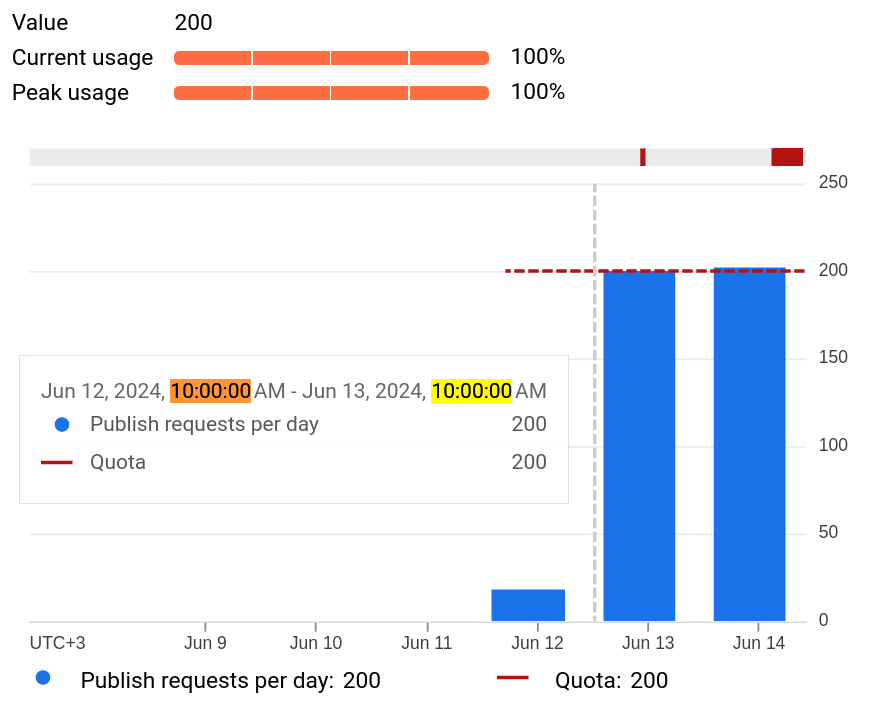
p.s. 6: не забывайте про квоты (лимит по количеству запросов в день), иначе получите ошибку:
{
  "error": {
    "code": 429,
    "message": "Quota exceeded for quota metric 'Publish requests' and limit 'Publish requests per day' of service 'indexing.googleapis.com' for consumer 'project_number:218896956380'.",
    "errors": [
      {
        "message": "Quota exceeded for quota metric 'Publish requests' and limit 'Publish requests per day' of service 'indexing.googleapis.com' for consumer 'project_number:218896956380'.",
        "domain": "global",
        "reason": "rateLimitExceeded"
      }
    ],
    "status": "RESOURCE_EXHAUSTED",
    "details": [
      {
        "@type": "type.googleapis.com/google.rpc.ErrorInfo",
        "reason": "RATE_LIMIT_EXCEEDED",
        "domain": "googleapis.com",
        "metadata": {
          "service": "indexing.googleapis.com",
          "consumer": "projects/218896956380",
          "quota_limit": "DefaultPublishRequestsPerDayPerProject",
          "quota_metric": "indexing.googleapis.com/v3_publish_requests",
          "quota_limit_value": "200",
          "quota_location": "global"
        }
      },
      {
        "@type": "type.googleapis.com/google.rpc.Help",
        "links": [
          {
            "description": "Request a higher quota limit.",
            "url": "https://cloud.google.com/docs/quota#requesting_higher_quota"
          }
        ]
      }
    ]
  }
}
Если что, посмотреть количество выполненных запросов в indexing можно на этой странице внизу.
Говорят, что запросить увеличение квоты можно с помощью формы на странице (форма открывается по кнопке "Edit Quotas") + заявки через эту форму.
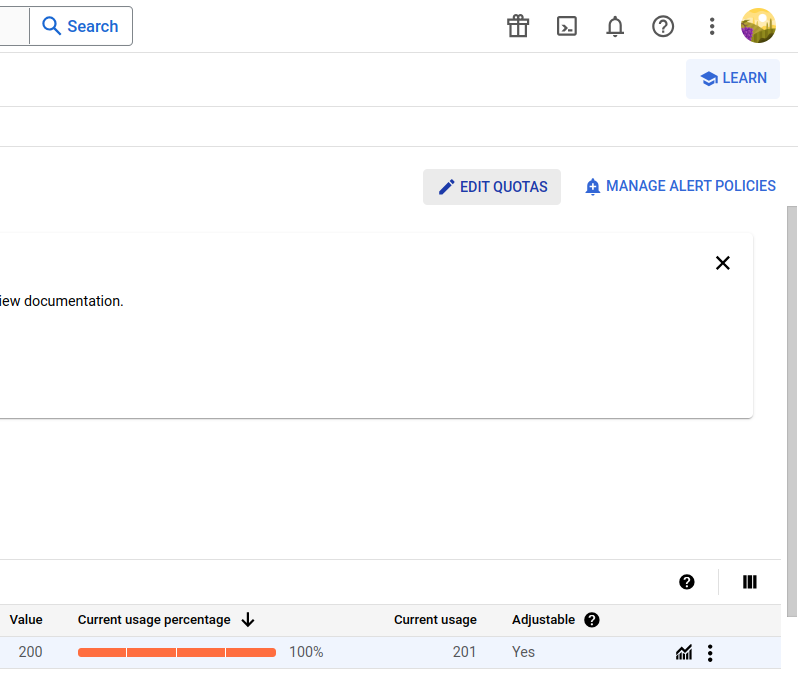
Важно знать, что лимит квоты пополняется каждый день в 10 утра по Москве:
Больше информации о квотах написано здесь.
Важно для понимания
- Часть приложений гугла работают через GOOGLE_API_KEY (в php-либе задается методом setDeveloperKey)
- Часть приложений гугла работают через Authentication "OAuth 2.0" используйте Client ID & Secret:
- GOOGLE_CLIENT_ID (в php-либе задается методом setClientId)
- GOOGLE_CLIENT_SECRET (в php-либе задается методом setClientSecret)
- Часть приложений гугла работают через "Service account" используя JSON-ключ (в php-либе задается методом setAuthConfig)
Список приложений (они же скоупы), смотрите здесь.
Источники: 1 - 2 - 3 - 4 - 5 - 6 - 7 - 8 - 9
Комментарии
Комментариев пока нет.