Выполнить команду от имени другого пользователя
1. runuser command as another user
The runuser command run a shell with substitute user and group IDs. This command is useful only when run as the root user:
Only session PAM hooks are run, and there is no password prompt. If run as a non-root user without privilege to set user ID, the command will fail as the binary is not setuid. As runuser doesn’t run auth and account PAM hooks (PAM - Pluggable Authentication Modules), it runs with lower overhead than su.
The runuser command options
- -l user_login_name : Make the shell a login shell, uses runuser-l PAM file instead of default one.
- -g group : Specify the primary group.
- -G group : Specify a supplemental group.
- -c COMMAND : Pass a single COMMAND to the shell with -c.
- --session-command=COMMAND : Pass a single COMMAND to the shell with -c and do not create a new session.
- -m : Do not reset environment variables.
- -u username : Run command as given username to get around ‘su -‘ or ‘sudo’ limit.
The syntax is:
runuser -l  userNameHere -c 'command'
runuser -l  userNameHere -c '/path/to/command arg1 arg2'
runuser -u user -- command1 arg1 arg2
For example, as a root user you may want to check shell resource limits for oracle user, enter:# runuser -l oracle -c 'ulimit -SHa'
Check nginx or lighttpd web server limitations:# runuser -l nginx -c 'ulimit -SHa'# runuser -l lighttpd -c 'ulimit -SHa'
Sometime, a root user can not browse NFS mounted share due to permission (security) issue:# ls -l /nfs/wwwroot/cyberciti.biz/http
OR# cd /nfs/wwwroot/cyberciti.biz/http
Sample outputs:
-bash: cd: /nfs/wwwroot/cyberciti.biz/http/: Permission denied
However, apache user is allowed to browse or access nfs based system mouted at /nfs/wwwroot/cyberciti.biz/http/:# runuser -l apache -c 'ls -l /nfs/wwwroot/cyberciti.biz/http/'# runuser -l apache -c 'cd /nfs/wwwroot/cyberciti.biz/http/; vi index.php'
No password is required to use runuser command and it must be run by root user only. Sometimes sudo or su will give following error:
$ su - www-data
This account is currently not available.
To get around this try the following syntax:# runuser -u www-data -- command## Run commands as www-data user ### runuser -u www-data -- composer update --no-dev# runuser -u www-data -- php7 /app/maintenance/update.php
2. Run a Linux command with substitute user and group ID using ‘su command’
The su command allows you to become a super user or substitute user, spoof user, set user or switch user. It allows a Linux user to change the current user account associated with the running console or shell provided that you know the target user’s password. The syntax is as follows:
su -
su - username
Switching to root user
su command asks for the target user’s password. Type su - at your shell prompt to switch to root user account (you must know the root user account password):vivek@wks01:~$ su -
Alternatively, we can type:vivek@wks01:~$ su - root
Here is how it looks:
Password:
root@wks01:/root# logout
vivek@wks01:~$
If the correct root password is provided, ownership of the session is changed to root account. Type logout exit a root login shell. Type whoami or id command to verify the owner of a session:whoami
ORid
Run command as root user
The syntax is:
su - root -c "command"
OR
su - -c "command arg1"
To view the contents of /root directory which is not accessible to normal users, run:
su - root -c "ls -l /root"
Please note that Linux and some Unix-like systems have a wheel group of users, and only allow these users to su to root.
Run command as another user using su command
The following command switches to user oracle’s account and shows a list of limits:
$ su - oracle -c 'ulimit -aHS'
Again, if the correct oracle password is provided, ownership of the session is changed to oracle account. The log of su command is kept in a system log, typically in /var/log/auth.log (Debian/Ubuntu) or /var/log/secure (RHEL/CentOS).
In this example run command using nginx user along with /bin/sh as shell:
su {userNameHere} -s /bin/sh -c "command1 arg1 arg2"
su nginx -s /bin/sh -c "chown nginx:nginx /var/www/html/static/logo.jpg"
su wwwjobs -s /bin/bash -c "/apps/scripts/pdfreports.py --config /apps/.config/pdf.conf"
3. The sudo command for Linux users
The sudo command executes a command as another user but follows a set of rules about which users can execute which commands as which other users. This is configured in a filed named /etc/sudoers. Unlike su, sudo authenticates users against their own password rather than that of the target user. Sudo allows a system administrator to delegate authority to give certain users (or groups of users) the ability to run some (or all) commands as root or another user while providing an audit trail of the commands and their arguments. This allow the delegation of specific commands to specific users on specific hosts without sharing passwords among them. The syntax is as follows:
sudo command
## Run command as 'vivek' user ##
sudo -u vivek command arg1
sudo -u www-data /path/to/task arg1 arg2
## Want to gain the root shell? Try ##
sudo -i
sudo -s
See the following links for more information:
- How to configure and use sudo tool under Linux operating system.
- sudo project home page.
4. A note about GUI tools ( GUI front-end for su and sudo )
The gksu command is a frontend to su and gksudo is a frontend to sudo. heir primary purpose is to run graphical commands that need root without the need to run an X terminal emulator and using su directly. The syntax is as follows:
gksu [-u <user>] [options] <command> gksudo [-u <user>] [options] <command>
Just type gksu, and you will be prompted as follows:

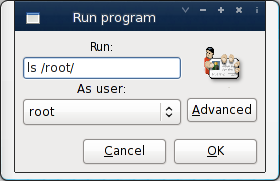
Fig.01: gksu in action
When prompted type root user’s account password:

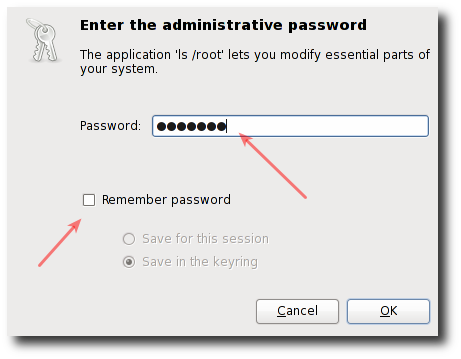
Fig.02: Gnome gksu authentication box for the target user
You can run command directly as follows:gksu -u root 'ls /root'
Let us run a command as an oracle user:gksu -u oracle 'ulimit -aHS'
Login as the root user:gksu -u root -l
The pkexec command
Unfortunately, gksu and other GUI front-ends were removed from certain Linux distros, and pkexec act as a replacement to execute a command as another user on those distros. The syntax is pretty simple:pkexec commandpkexec --user {userNameHere} /path/to/command arg1
Run command as the root user:$ pkexec id$ pkexec bash
If username is not specified, then the program will be executed as the administrative super user, root
Executing a program as a root user is a privileged operation by default, the required authorization. Hence we will see the GUI box as follows:

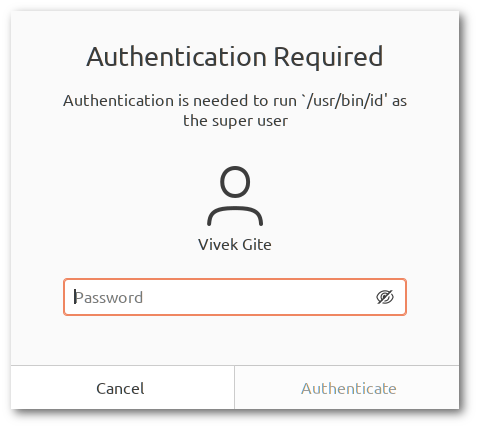
Fig.03 – In addition, the authentication dialog presented to the user will display the full path to the program to be executed so the user is aware of what will happen.
Summary: runuser vs su vs sudo vs pkexec
| Command | Root to user | User to root | Any to any user | Auth type | Log file | Remark |
|---|---|---|---|---|---|---|
| runuser | Y | N | N | None | N/A | As runuser doesn’t run auth and account PAM hooks, it runs with lower overhead than su. |
| su | Y | Y | Y | Target user’s password | /var/log/auth.log or /var/log/secure | You must share your password or root password with other users. |
| sudo | Y | Y | Y | Authenticates users against their own password rather than that of the target user. | /var/log/auth.log or /var/log/secure | Allows a system administrator to delegate authority to give certain users (or groups of users) the ability to run some (or all) commands as root or another user while providing an audit trail of the commands. |
| pkexec | Y | Y | Y | Authenticates users against root password or their target password. | /var/log/auth.log or /var/log/secure | Act as a replacement for GUI tools such as gksu or gksudo on modern Linux distros. |
Viewing sudo/pkexec log files
Use the tail command/grep command or cat command as follows:$ sudo tail -f /var/log/auth.log$ sudo tail -f /var/log/secure$ sudo cat /var/log/auth.log
Sample outputs:
Dec 10 16:20:02 nixcraft-wks01 pkexec: pam_unix(polkit-1:session): session opened for user vivek by (uid=0)
Dec 10 16:20:02 nixcraft-wks01 pkexec[70876]: vivek: Executing command [USER=vivek] [TTY=/dev/pts/2] [CWD=/tmp] [COMMAND=/usr/bin/id]
Dec 10 16:20:04 nixcraft-wks01 CRON[70880]: pam_unix(cron:session): session closed for user vivek
Dec 10 16:20:08 nixcraft-wks01 sudo: pam_unix(sudo:auth): Couldn't open /etc/securetty: No such file or directory
Dec 10 16:20:10 nixcraft-wks01 sudo: pam_unix(sudo:auth): Couldn't open /etc/securetty: No such file or directory
Dec 10 16:20:10 nixcraft-wks01 sudo:    vivek : TTY=pts/2 ; PWD=/tmp ; USER=root ; COMMAND=/bin/bash
Dec 10 16:20:10 nixcraft-wks01 sudo: pam_unix(sudo:session): session opened for user root by (uid=0)
Dec 10 16:20:14 nixcraft-wks01 pkexec: pam_unix(polkit-1:session): session opened for user vivek by (uid=0)
Dec 10 16:20:14 nixcraft-wks01 pkexec[70908]: root: Executing command [USER=vivek] [TTY=/dev/pts/2] [CWD=/root] [COMMAND=/usr/bin/id]
Summing up
We saw and talked about various command-line and GUI methods to run command as another user on Linux. I would strongly suggest using sudo CLI and pkexec GUI methods. See man pages for more information about su, sudo, gksu, gksudo, and pkexec commands by typing the following man command
man sudoman pkexec
Источник: 1